
Tips about How To Hide WhatsApp Status
As you know, WhatsApp is the most popular social platform where millions of people connect. This is the most convenient communication medium in the world. People choose this app to communicate with their loved ones easily. It has various outstanding features such as sending or receiving messages, voice notes, group chatting, audio calls, video calls, and sharing statuses with their contacts.
Most people show their feelings by sharing their stories and statuses. However, some introverted people don’t want to share their statuses with all their contacts. They try to hide their status from someone on their contact list.
Furthermore, WhatsApp allows users to hide or unhide their statuses from their contact lists. Users can allow some people to watch their status or story and hide some contacts. There is also an option to share stories with special people. So, we have provided the steps for how to hide WhatsApp status on Android. Read the steps and follow them to achieve your task.
You can download YoWhatsApp APK for free for Android
How To Hide WhatsApp Status?
To hide your status from the special people in your contact list, follow the steps below:
- First, open WhatsApp and go to your Status
- Go to the right corner and tap on the three dots
- Select the status privacy
- Now you will have an option, “Who can see my status updates,” at the top of the screen
- Tap on the “My contacts except…” option and select the contact for whom you want to hide your status
- Now you are done; you hid your status from unwanted contacts
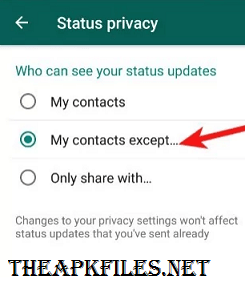
How to show WhatsApp status for special persons?
- Go to status privacy
- Tap on the option ” Only share with…”
- Select your desired contact and confirm to show
- Go back to your status option and share your status with your desired contacts
Now, WhatsApp will show your status only to your desired contact, and no one can see your special feelings.
How To Hide Messages Seen On WhatsApp?
Sometimes you need to hide your message from being seen due to various reasons. It’s not a difficult process. Read the points below and follow them.
- First, open your WhatsApp and tap on the chat menu
- Go to the top right corner and click on the three dots
- Now tap on the settings, which is at the end of the options
- Tap on Privacy, which is the second position
- Now find “Read Receipts” and turn off the button
- You are done now; no one can see your last seen
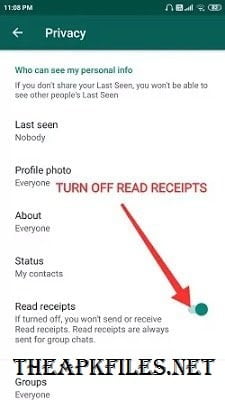
If you want to show your message to your contacts, then follow the same steps and turn off the “Read Receipts” button. Your message will be seen by all your contacts.
How To Hide Last Seen And Online on WhatsApp?
If you want to hide your last seen or online status from your contact, then follow the steps below to do it.
- Open your WhatsApp and tap the top-right three dots
- Click on Settings>> Privacy
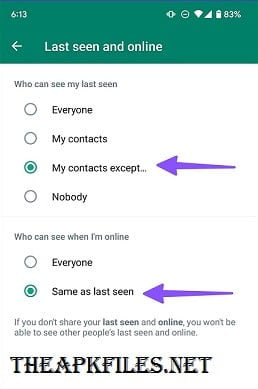
- Now open Last seen and online
- You will have options>> “Who can see my last seen.”
- Select any option that you want: ” Everyone, My contacts, My contacts except, Nobody.
- Choose one of them and confirm
- Now the second option you will have is>> “Who can see when I am online?”
- Select one that you want: ” Everyone, Same as last seen.”
- Select and tap the one and confirm.
How to hide a profile photo on WhatsApp?
It’s an easy method to hide your profile photo on WhatsApp. Follow the provided points below
- Open WhatsApp and tap the three dots on the top right
- Click setting>>Privacy
- Tap on “Profile photo.”
- You will have “who can see my profile photo.”
- Select any option >> ” Everyone, My contacts, My contacts except, Nobody.”
- You can select any one of them and confirm.
How to change your number on WhatsApp?
Sometimes, you need to change the number on your WhatsApp for several reasons. If you want to change your number on WhatsApp, then follow the points below to easily change it.
- First, open your WhatsApp app and tap on the three dots, which are at the top right
- Now open the settings and go to Profile
- Tap on your profile name, and you will see the number below
- Tap on the number and then change it
- Now you will have an option to enter your number
- Enter your new number, and next to send the code to your new number
- Put the received code in the box and confirm
- You are done now. You can use your new number
You can also change your profile name and about in the same place.
How to Install WhatsApp on an Android Phone?
- First, you have to download the app from an authentic website
- Go to your phone settings>> Unknown Sources>> Enable to permit the app
- Now tap the downloaded APK file of WhatsApp to install and wait a few seconds
- It will install successfully and show a notification on your screen
- Now tap to open the app, and it will show the option to enter your mobile number
- Enter the number on which you want to use WhatsApp
- Tap Next, and it will send a code to your mobile number
- Enter the code in the box and next
- Now tap your profile and upload a profile photo
- Write something on “About,” or you can use any emoji
- You are done now; you can use and start chatting with your contacts
Conclusion
Overall, WhatsApp is the largest social platform where more than millions of people are interconnected with each other. People from globally communicate through different features of this app, including calls, chat, or other group activities. So it’s an authentic and more popular communication platform that provides a more convenient service to its users.
There is no chance of interruption, even a little bit, while providing its service. It manages and organizes all global users’ data. So, it’s a wonderful social platform for smooth communication.
FAQs
Which is the best social app for communication?
WhatsApp is very useful and one of the best apps for communication. People across the world choose this platform for great communication.
Is it safe and secure to use?
Yes, this app is 100% safe and secure to use. It has great end-to-end encryption to provide great security for the user’s privacy. You can use it, feel free, and all your data will be safe.
Can I use WhatsApp on Android?
Yes, you can use WhatsApp on your Android phone. This app is designed for both Android and iOS operation system.
Can I use WhatsApp without the internet?
No, it needs full internet access to use the WhatsApp service.





What i don’t realize is in fact how you are now not really much more neatly-appreciated than you might be right now. You’re very intelligent. You recognize thus considerably relating to this subject, made me for my part imagine it from numerous varied angles.