
How To Use AnyDesk on Android?
AnyDesk is a smart app allowing users to access remote devices to perform activities like document editing or other tasks. This great software enables users to perform easy tasks from one mobile phone to another remotely. It becomes easy to access remote devices with the AnyDesk app and get control of all the devices. Several tasks can be performed now easily, including document editing, online working, making changes to other devices, and assisting the other person remotely with the help of this app. We have mentioned some key points below in “How To Use AnyDesk on Android”.
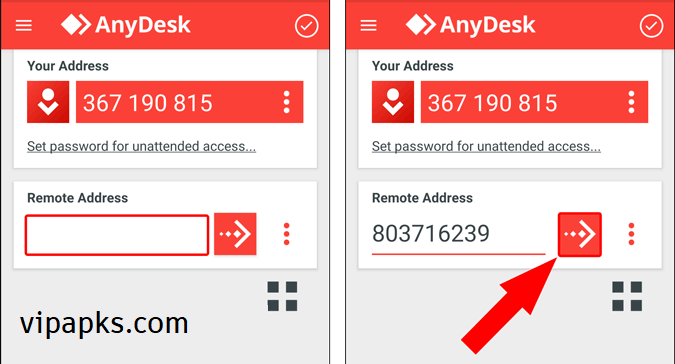
- Open the app on your phone and access the interface
- You will find the option ” Enter AnyDesk ID.”
- Make sure AnyDesk is installed on both devices
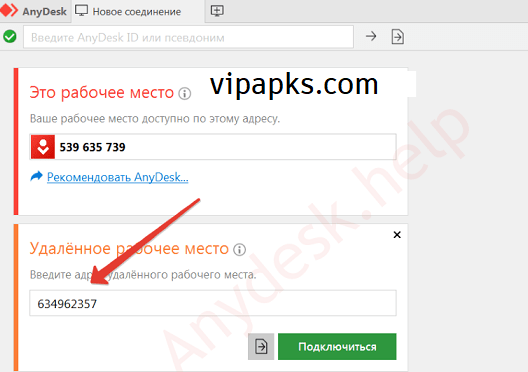
- Click on the remote device or AnyDesk ID
- Enter the remote device’s AnyDesk ID in the ” Enter AnyDesk ID ” option
- Now tap the join option on your device
- Accept the request to join the remote device
- Once you accept the request, you get access to full control of the remote device
- You can perform any type of activity on the other device with full control
How to Install AnyDesk on an Android Phone?
First, you need to download the AnyDesk app from the given link ( https://vipapks.com/anydesk-apk). We have provided the latest updated APK file for our website users. Once you download the app, follow the instructions below to install the app successfully on your phone.
- Find the app in your download folder
- Go to your phone settings and enable Unknown Sources to permit the app
- Now tap the downloaded file to install
- Wait a moment; it will successfully install within a few seconds
- Now you will find a notification on your screen, “Successfully installed.“
- Tap to open the app and enjoy its wonderful features
Core Features of AnyDesk APK
The app has been designed with high-quality features to provide a more convenient service. Below are some key features of this app.
Remote Access
Remote Access is the main function and service of the AnyDesk app. This app is specially designed to provide access to remote devices to perform any kind of activity. It offers convenient and easy remote access to control remote devices.
Fast Service
This is a very fast and responsive app that you can use to perform your remote activities without wasting a long time. You will never face any slow response issues using this app on your device.
Quite Easy and Simple Interface
To make it more convenient, the developer designed a unique and easy interface so that users should never face any difficulties while using the app. Anyone can easily use this app without any hassle.
Security System
The app provides full security for your data and other relevant information. It never shares your data with anyone. Both devices will be encrypted and protected from all kinds of malware or virus attacks.
What is the User’s Experience of AnyDesk APK?
The app offers high-quality and the most secure service to its users. Everyone appreciates its wonderful service and cool features. Users can fulfill their desires within a few moments, no matter how far it is. It gives full access to remote devices to easily connect and perform all kinds of activities. This is a great source for all Android users to enjoy its quality service and perform their favorite tasks without any hassles.
Conclusion
Overall, the AnyDesk app is a wide platform to connect people worldwide to perform tasks in a group. It allows you to share screens or get full access to remote devices. It’s a great option to help one another, no matter how far the other person is. Just connect your devices with the help of this app and perform any kind of activity, whether it is official or private. This is a great package for all users to access remote devices.
FAQs
Can I connect an Android to a PC using the AnyDesk app?
Yes, you need to install the Bluestak software on your PC to access Android
apps. BlueStacks software will let you use Android applications and access them remotely.
Can I group work using AnyDesk?
Yes, you can group work using this app easily.
Is AnyDesk safe to use on mobile?
Yes, this is a more secure and safe application to use on your Android phone.
What is the purpose of the AnyDesk app?
This app is designed to connect to the remote device and provide full access to work remotely.
Can I get full access to a remote device using the AnyDesk app?
Yes, it lets you get full access to remote devices without any difficulties.



I’ve been surfing on-line greater than three hours these days, but I by no means found any fascinating article like yours. It is beautiful value sufficient for me. Personally, if all web owners and bloggers made good content material as you probably did, the internet will be a lot more useful than ever before.
I like what you guys are up too. Such intelligent work and reporting! Keep up the superb works guys I’ve incorporated you guys to my blogroll. I think it will improve the value of my site :).